1. Overview of bidding and budget management
With the Bidding and Budget Management feature, advertisers can:
-
Set bids that align with their advertising objectives.
-
Choose between Auto Bid and Manual Bid.
-
Control campaign delivery and spending pace.
-
Adjust bids and budgets to optimize advertising performance at each stage of the campaign.
2. About bidding
2.1. How to set a bid
-
Method 1: Set the bid when creating a campaign
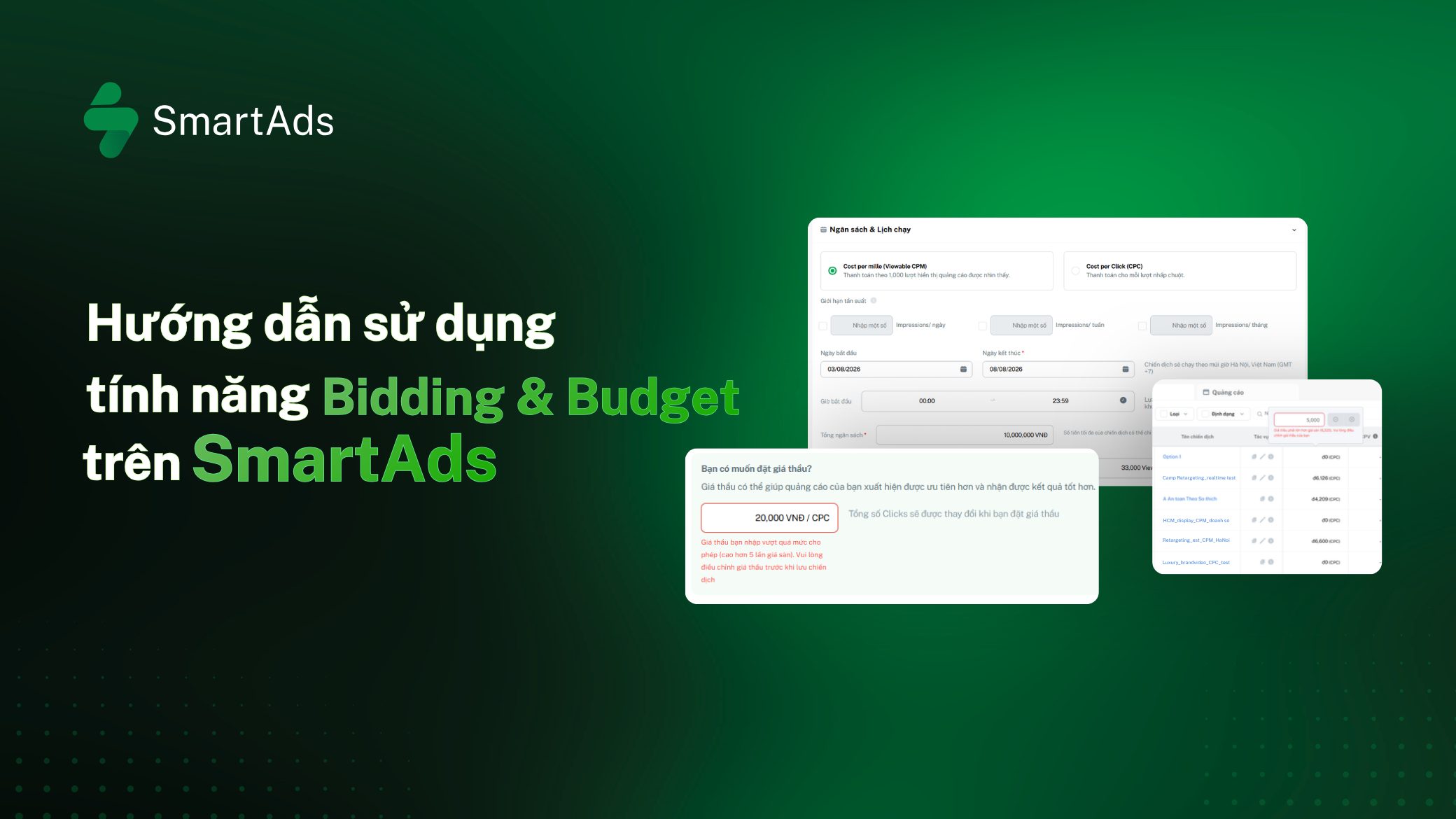
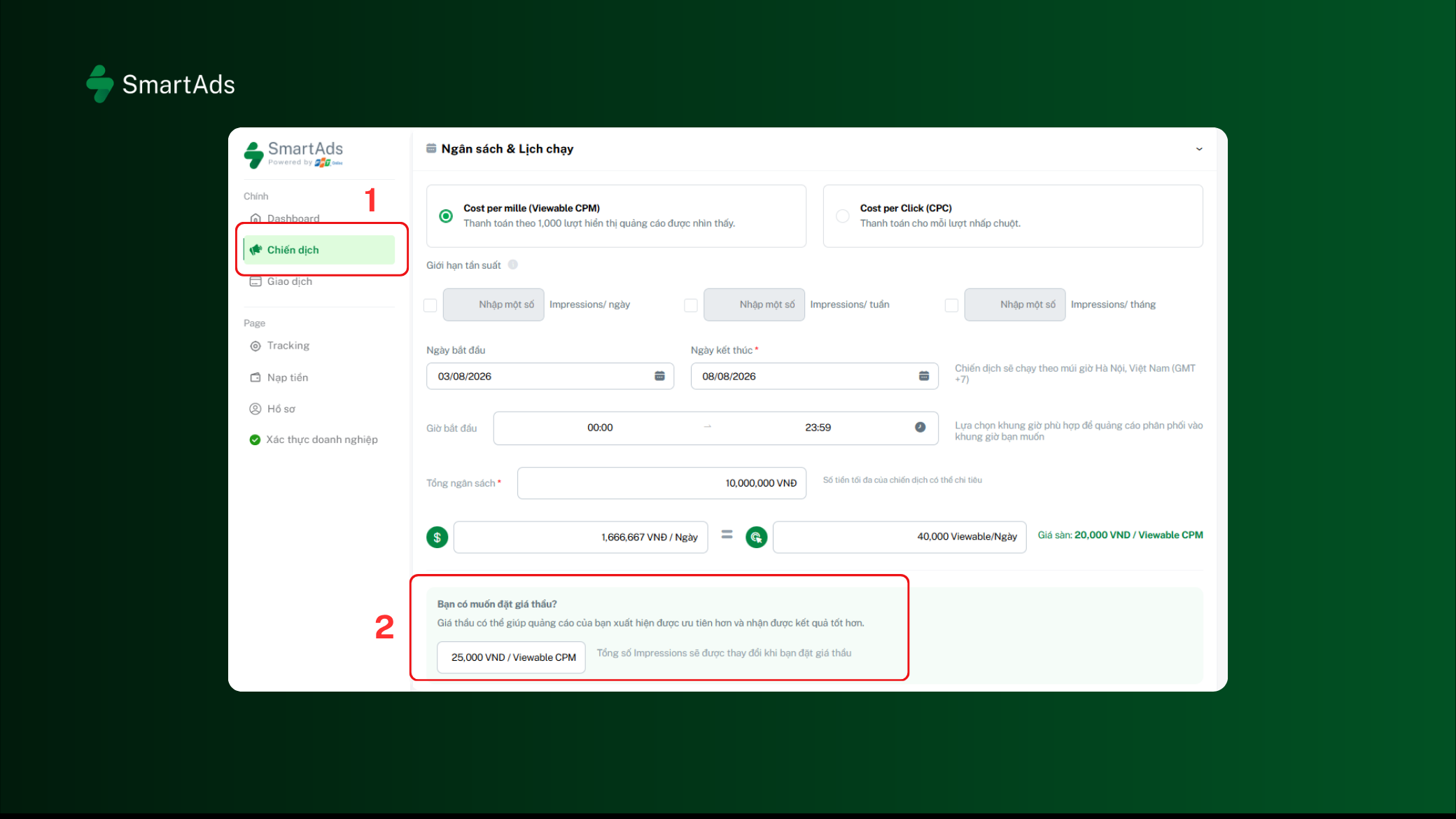
In the “Do you want to set a bid?” section during campaign setup (1), advertisers can set their desired bid by entering the bid in the input field (2).
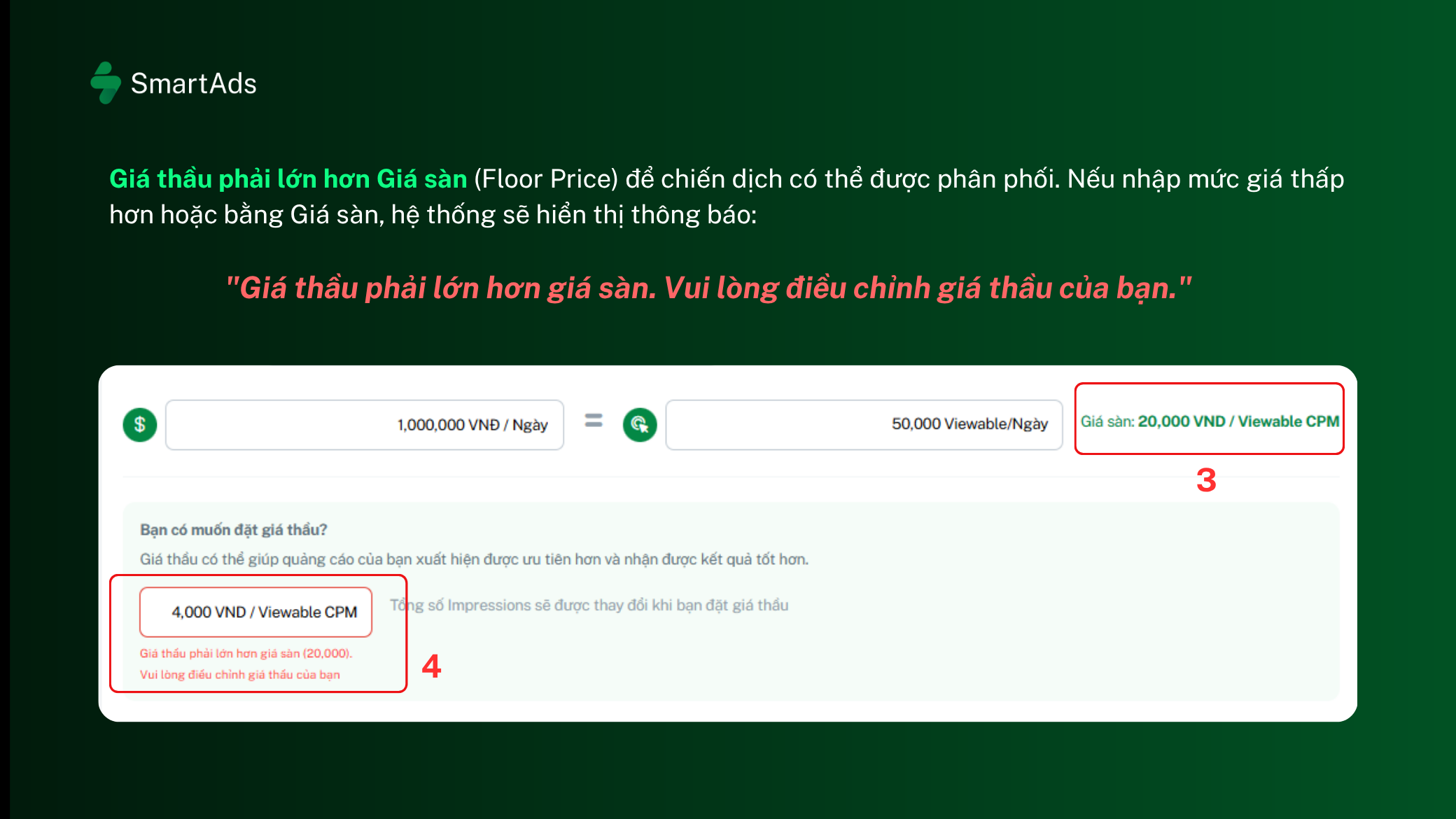
The bid must be higher than the Floor Price (3) for the campaign to be delivered. If the entered bid is lower than or equal to the Floor Price, the system will display the following message: "Your bid must be higher than the floor price. Please adjust your bid." (4)
Note:
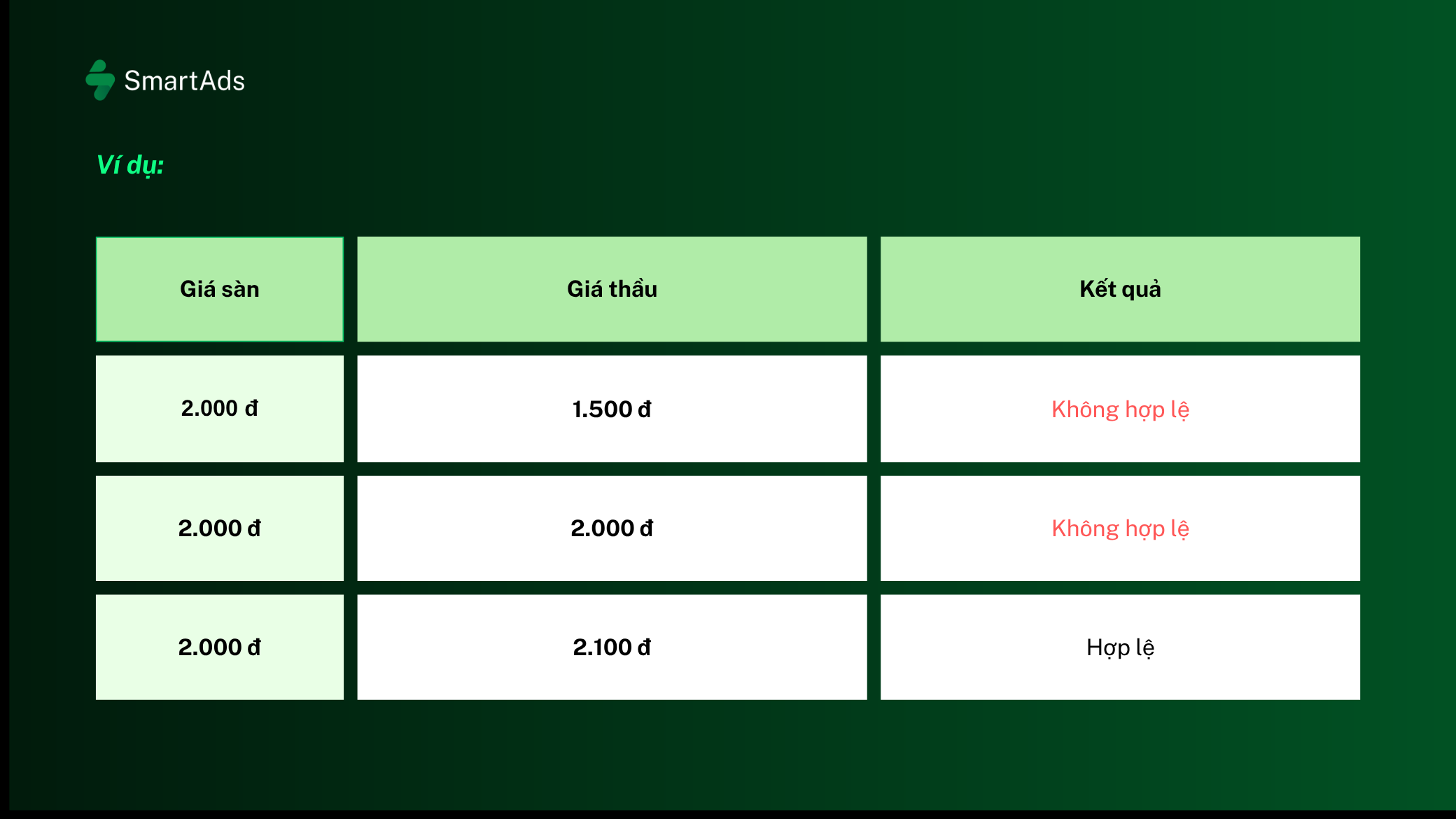
- The Floor Price is automatically calculated by SmartAds and may change when you adjust targeting conditions or select different inventory.
Example:
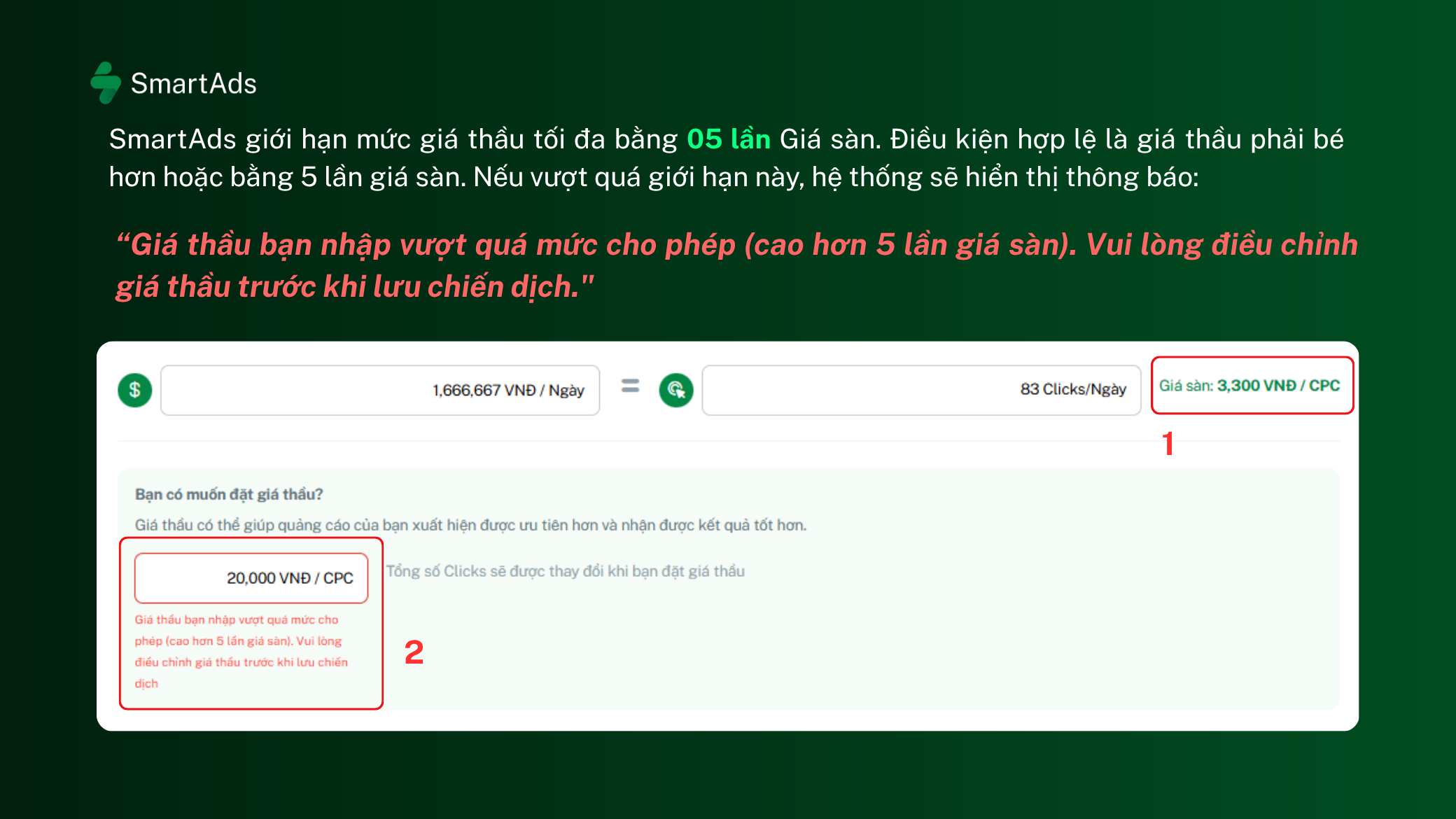
To ensure a stable auction mechanism, SmartAds limits the maximum bid to 5 times the Floor Price. The valid bid must be less than or equal to 5 times the Floor Price. If the bid exceeds this limit, the system will display the following message: "The bid you entered exceeds the maximum allowed limit (more than 5 times the floor price). Please adjust the bid before saving the campaign."(2)
-
Method 2: Quickly adjust the bid from the Campaigns section
In addition to setting a bid during campaign creation, advertisers can view and adjust bids directly from the Campaigns section in the Sidebar Menu.
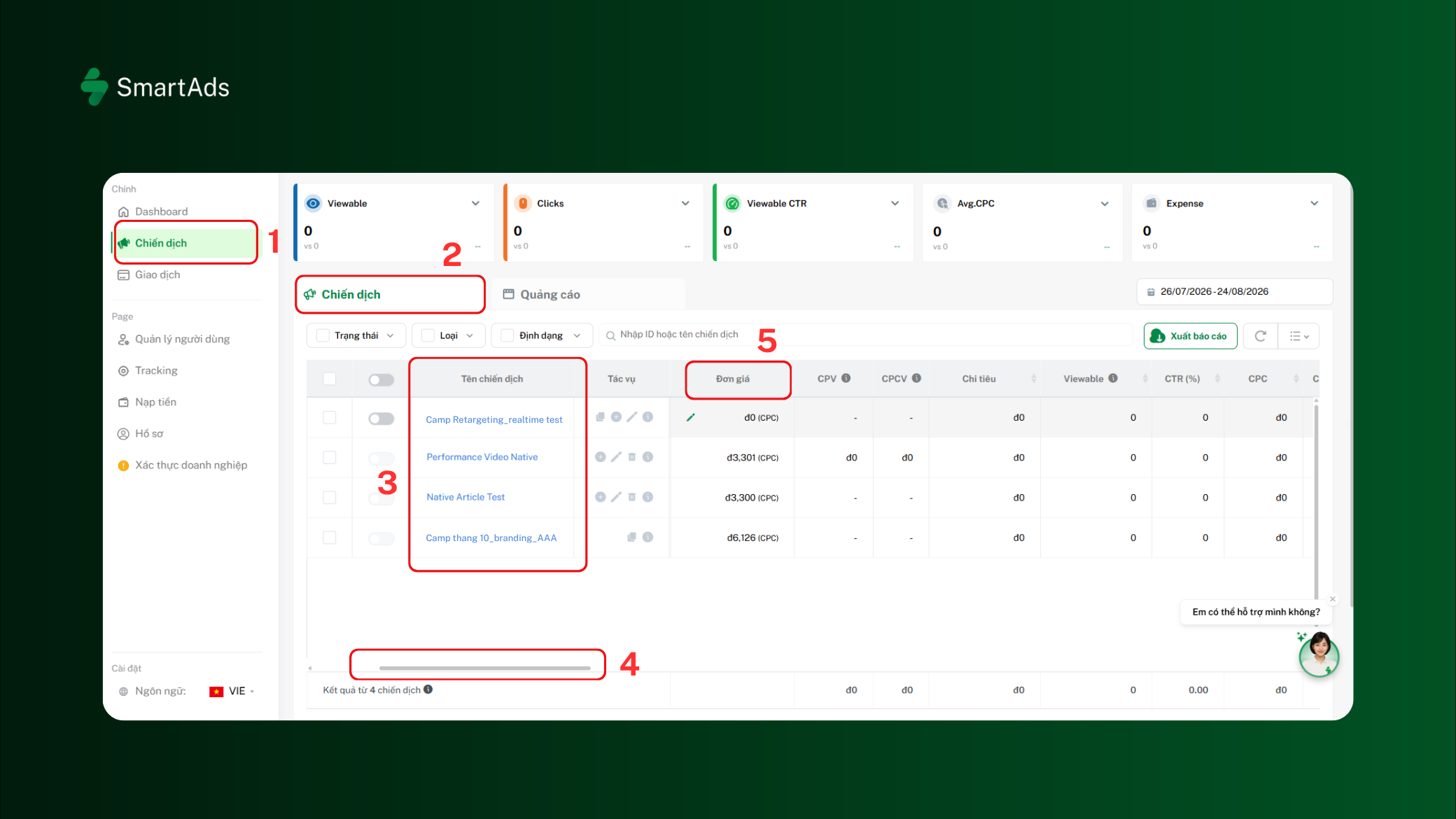
Step 1: From the Sidebar Menu, select Campaigns (1), then go to the “Campaigns” section (2).
Step 2: Select the campaign for which you want to adjust the bid (3).
Step 3: Scroll horizontally (4) to the Unit Price column (5)
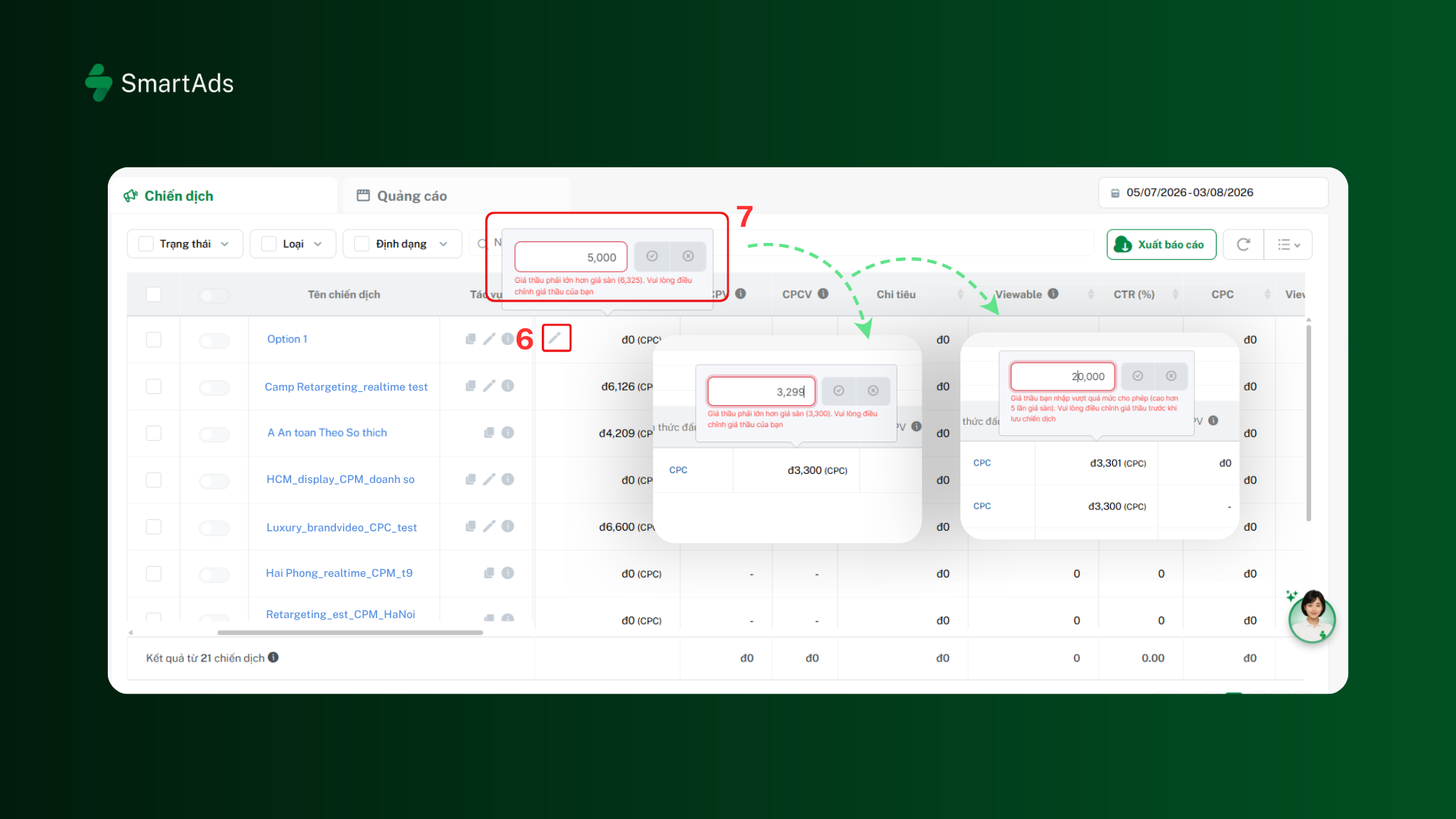
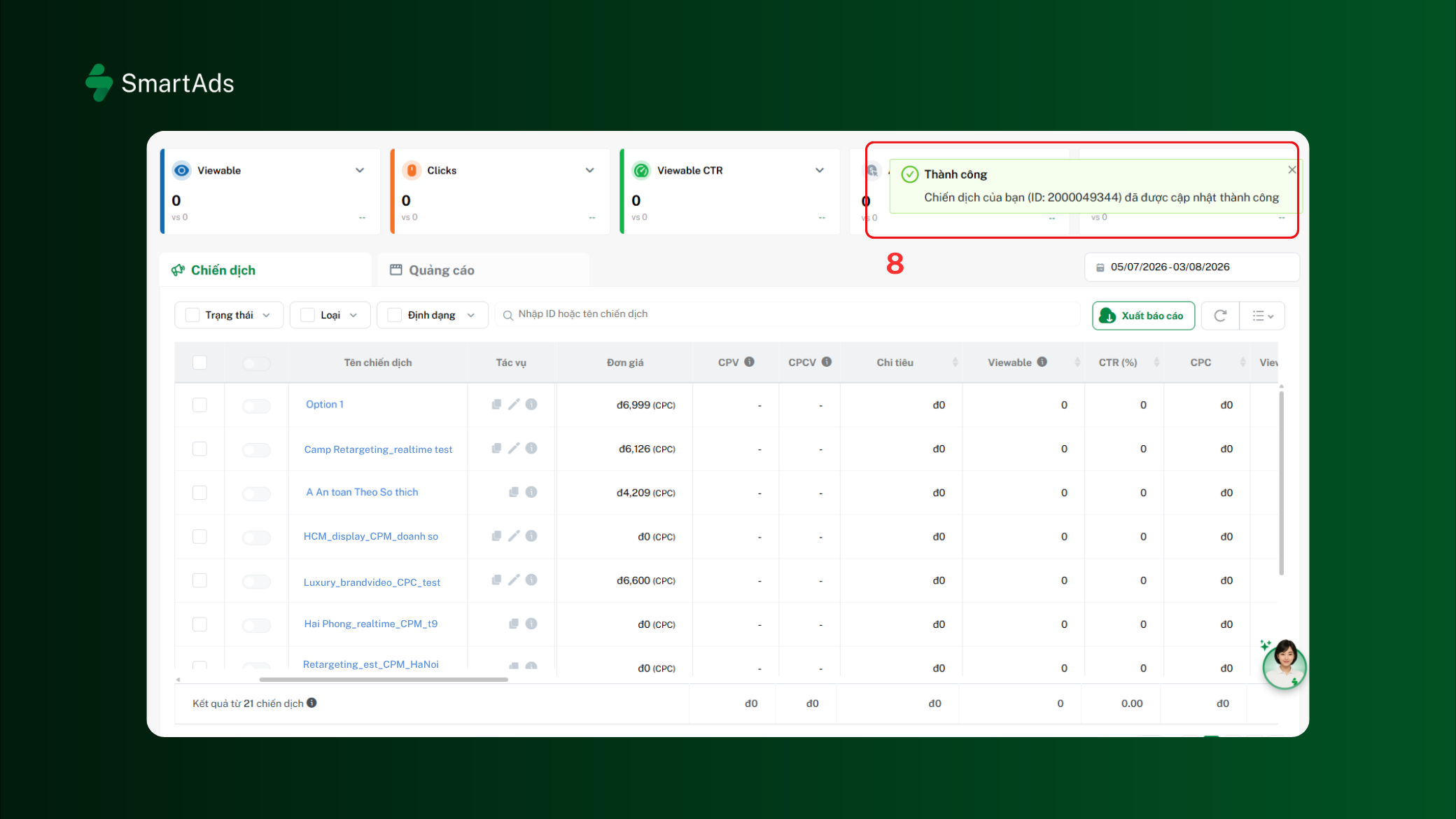
Step 5: Click Save to complete the update. If the bid is valid, the system will display a “Success” notification (8).
2.2. Choosing a bidding method
SmartAds supports two bidding methods to suit different advertising objectives.
2.2.1. Default Bid
With Default Bid, the system automatically uses the Floor Price as the bid to participate in the advertising auction on the platform.
This method is suitable when: You are new to SmartAds and do not yet have sufficient data from previous campaigns. You want to reduce the time spent monitoring and making manual adjustments. You are running branding campaigns or aiming to maximize reach.
Example: Advertiser A is running an advertising campaign on SmartAds for the first time and does not yet have sufficient data to determine the appropriate bid for its target audience and inventory. To avoid continuously monitoring and manually adjusting the bid, the advertiser chooses Default Bid so that the system can automatically optimize the bid and support stable campaign delivery within the allocated budget.
2.2.2. Manual Bid
Advertisers can proactively enter their desired bid for a campaign. This method is suitable when you have data from previous campaigns, want to control costs based on KPIs, are running performance campaigns, or want to scale an existing campaign that is already delivering strong results.
Example: A Lead Generation campaign is using Manual Bid and is continuously monitored by the advertiser. After running for a period of time, the campaign maintains a stable and efficient CPA while still having room to expand its audience. The advertiser can gradually increase the bid to improve delivery and reach more potential customers, while continuing to monitor CPA to ensure costs remain within the target KPI.
It is important to note that a Manual Bid must always be higher than the Floor Price calculated by the system when the campaign is set up. The Floor Price may vary depending on the campaign's targeting settings and delivery conditions.
2.3. When does the Floor Price change?
The Floor Price is automatically calculated by the system based on the campaign settings. When certain targeting options are changed, the Floor Price may be updated. Common cases include:
-
Sentiment: When selecting 1 Sentiment or 2 Sentiment options, the system automatically adds 20% to the bid to improve delivery to relevant content groups.
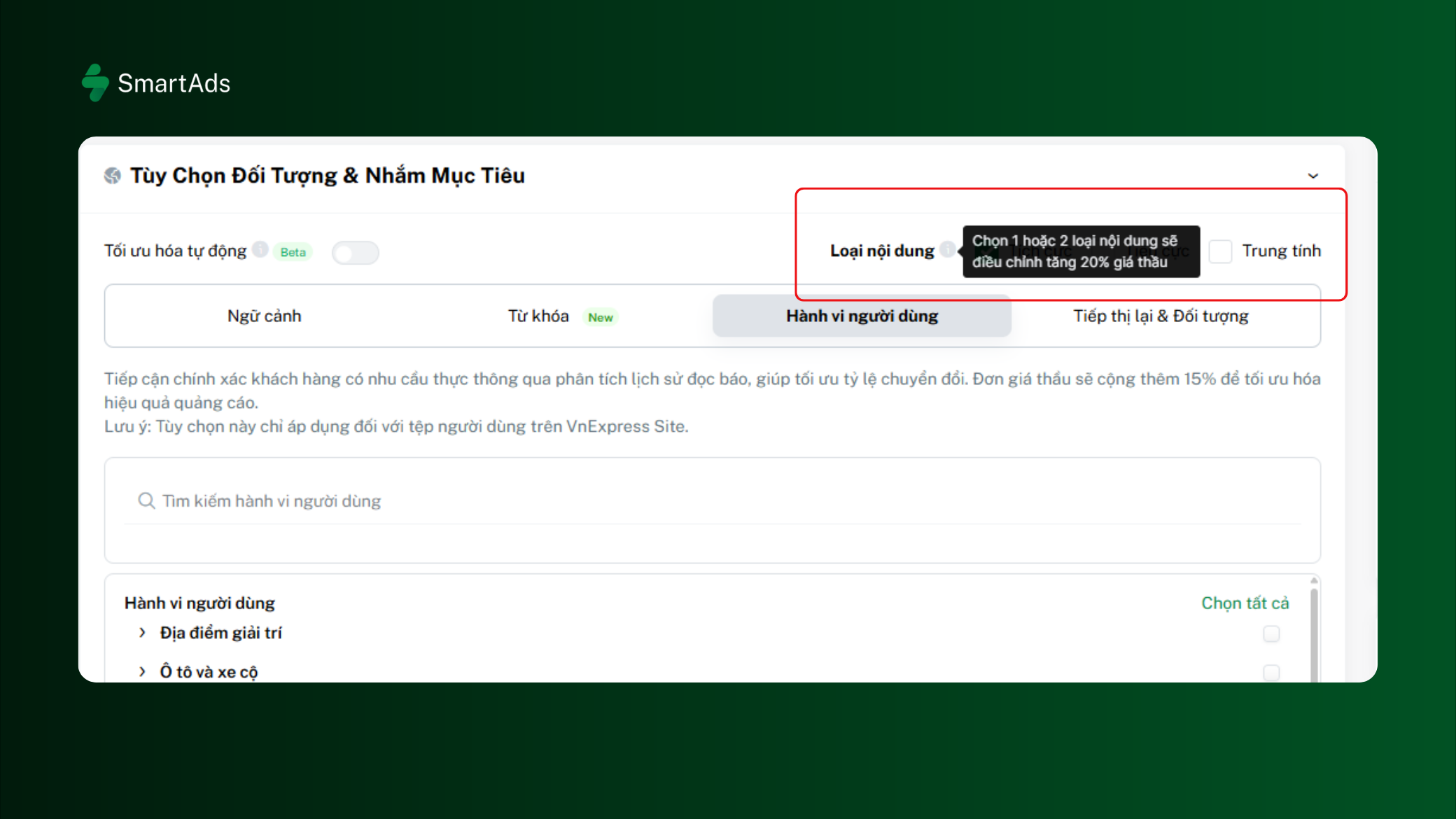
- Advanced Targeting: Certain options such as User Behavior and Remarketing & Audience
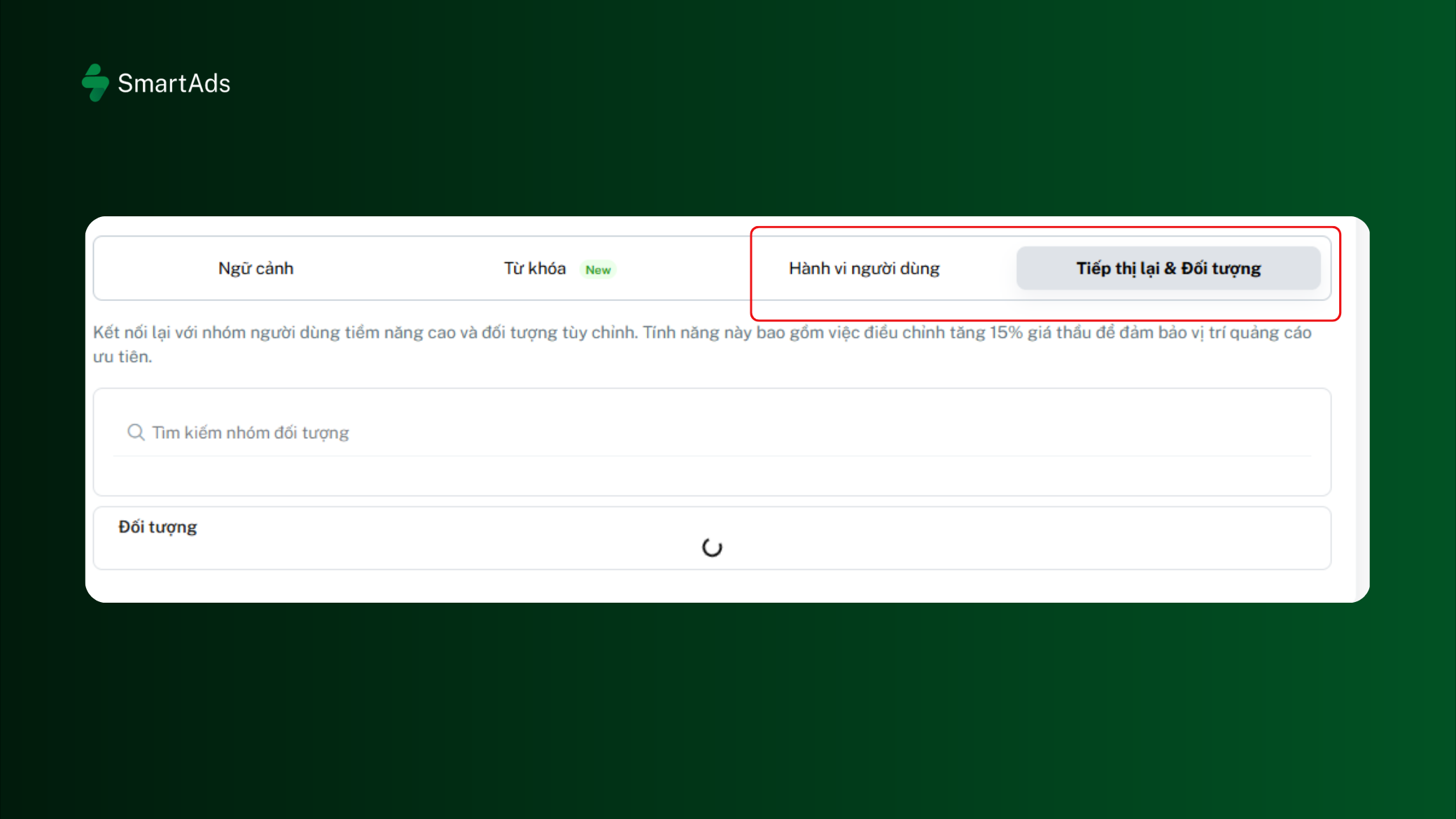
If these conditions are changed during campaign setup, the system will automatically update the Floor Price accordingly.
2.4. When should you adjust your bid?
During campaign delivery, the bid is not necessarily a fixed parameter. You can adjust it based on the campaign's actual performance, while ensuring that it does not fall below the valid Floor Price.
2.4.1. When should you increase your bid?
Consider increasing the bid in the following situations:
-
Campaign delivery is slow
If Impression volume remains very low after several hours or a full day of campaign delivery, the bid may not be competitive enough.
Example: Daily Budget: VND 2,000,000. After one day, only around VND 250,000 has been spent, while the campaign still has substantial available inventory. In this case, slightly increasing the bid may allow the ad to participate in more auctions and improve delivery.
-
You want to scale the campaign
If CPA, CPL or ROAS is meeting the target, a reasonable bid increase can help reach more potential customers while maintaining campaign efficiency.
Example: A campaign is generating 50 orders per day with a stable CPA, while there is still room to expand the target audience. In this case, a slight Bid increase can help scale campaign delivery and reach more potential customers.
2.4.2. When should you decrease your bid?
A higher bid does not always result in better performance. Consider lowering the bid when:
-
Advertising costs are high but conversion performance is not improving: When advertising costs are not proportional to the results generated, you may consider adjusting the Bid to control costs. However, on SmartAds, CPC/CPM is set at a fixed rate, so advertisers can proactively adjust the Bid based on campaign objectives and actual performance.
-
The budget is spent too quickly at the beginning of the day: In this case, check the Target Audience (TA) before adjusting the Bid. An overly broad Target Audience may cause the ad to reach a large number of users and spend the budget quickly. In addition, for broad-reach campaigns, the budget may not be distributed evenly throughout the day.
-
CPA exceeds the KPI for several consecutive days: You may consider lowering the Bid, but should also review other factors such as Content, Targeting, audience quality, and conversion performance before making a decision.
Example: A campaign has a Daily Budget of VND 1,000,000, but has already spent more than 90% of its budget by 10 a.m. In this case, you should not automatically reduce the Bid. Instead, check the Target Audience size and delivery settings. If the TA is too broad, refining the audience can help control the budget spending pace more effectively.
3. Campaign budget management
When setting up a campaign on SmartAds, advertisers need to enter the Total Budget and campaign duration. Based on these two inputs, the system automatically calculates the Daily Budget and the estimated number of Clicks for CPC campaigns or estimated Viewables for CPM campaigns.
3.1. Total Budget
The Total Budget is the maximum amount a campaign is allowed to spend throughout its entire duration. This is a mandatory parameter when creating a campaign.
Example: An advertiser creates a campaign with:
-
Start date: August 1, 2026
-
End date: August 30, 2026
-
Total Budget: VND 30,000,000
In this case, the campaign's total spend will not exceed VND 30 million throughout the campaign period.
Note: When the campaign duration or Total Budget is changed, the system will automatically update the relevant values.
3.2. Daily Budget
After the Total Budget and campaign duration are entered, SmartAds automatically calculates the Daily Budget to help advertisers monitor the campaign delivery pace.
Example:
-
Total Budget: VND 30,000,000
-
Campaign duration: 30 days
-
Estimated Daily Budget: VND 1,000,000/day
Based on the Daily Budget and the configured bid, the system also displays the estimated number of Clicks for CPC campaigns or estimated Viewables for CPM campaigns.
For CPC campaigns:
-
Daily Budget: VND 1,000,000
-
Bid: VND 5,000/CPC
-
Estimated Clicks: approximately 200 clicks/day
For CPM campaigns:
-
Daily Budget: VND 1,000,000
-
Bid: VND 20,000/CPM
-
Estimated Viewables: approximately 50,000 viewables/day
Actual values may vary depending on the bid, available inventory, and campaign delivery conditions.
Displaying the Daily Budget, Estimated Clicks, and Estimated Viewables helps advertisers evaluate whether the current budget is appropriate for their campaign objectives before launching the campaign.
Note: The Daily Budget and estimated Click volume are for reference only. Actual campaign delivery depends on the bid, target audience, available inventory, and the level of competition at each point in time.
4. Additional considerations
During campaign management, advertisers should keep the following principles in mind:
- Avoid frequent changes: After each Bid or Budget adjustment, allow the campaign to run for a certain period before evaluating the results. Making changes too frequently may prevent sufficient data from being collected to accurately reflect actual campaign performance.
- Do not rely on a single metric when optimizing bidding: When optimizing Bidding, consider the relationship between multiple performance metrics rather than evaluating the campaign based on a single metric:
-
High CPC but good CPL: Clicks may be expensive but still generate high-quality leads efficiently. Do not rush to lower the Bid; instead, continue monitoring lead quality and conversion performance.
-
Low CPC, high CTR but low Impressions: The ad is likely effective at attracting users but is not being delivered at sufficient volume. Consider expanding Targeting (context, location, device...) and evaluating whether a Bid increase is appropriate.
-
High CTR, many Clicks but low Conversions: The ad is attracting users but is not generating the desired final outcomes. Further investigate traffic quality and landing page behavior, such as Time on Site and Page Views, to determine whether the issue lies in the traffic or the landing page content and user experience.