I. Introduction to Brand Video Ads (Outstream video advertising)
Brand Video Ads, also known as Outstream Video, is a video advertising format on SmartAds that appears outside of original video content. These ads are typically placed within articles, featured content sections, or other high-attention placements on online publisher sites. After the video ends, the SmartAds system will automatically display a companion static banner in the same placement, helping brands maintain visibility and reinforce recall in users’ minds.

Unlike Performance Video Ads, which focus on engagement and traffic-driving actions, Brand Video Ads are designed primarily for brand awareness campaigns. This format enables brands to deliver messages through motion, sound, and storytelling in a more immersive and impactful way.
1.1. Brand Video Ads primarily support branding objectives
With high-visibility placements and strong storytelling capabilities, Brand Video Ads on SmartAds effectively support the following branding goals:
-
Scale brand awareness: Video ads placed in premium, high-attention positions help brands reach a large audience quickly, making them ideal for mass awareness campaigns.
-
Deliver emotionally engaging brand messages: Motion visuals combined with audio and pacing allow brands to tell compelling stories, significantly improving memorability compared to static banners.
-
Support product launches and phased campaigns: This format is ideal for product launches, brand repositioning, or seasonal marketing campaigns requiring consistent messaging.
1.2. Brand Video Ads placements and formats
Brand Video Ads on SmartAds can be distributed across multiple high-visibility placements on publisher websites, depending on layout structures and selected packages, including:
-
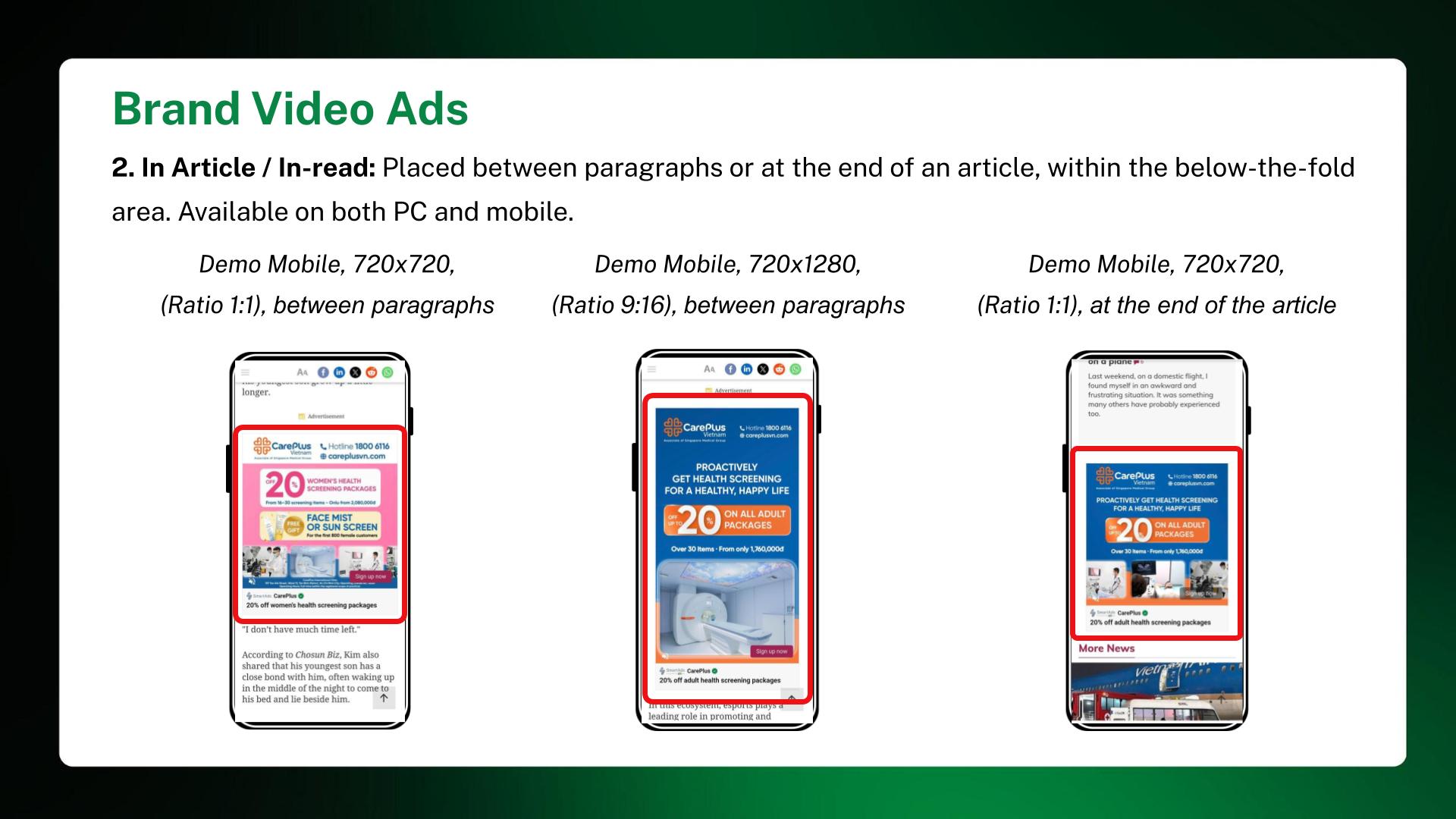
In-article: Video ads appear within article content, seamlessly integrated into the reading flow while capturing user attention.
-
Breakpage: Video ads appear on transitional pages, creating visual pauses as users navigate between content.
-
Large (sidebar placement): Video ads are displayed in large sidebar units, ensuring strong visibility throughout the user’s reading journey.

-
In-feed: Video ads appear within content feeds or article lists, blending naturally into users’ browsing experience.
-
In-comment: Video ads are displayed in comment sections, where user engagement and attention levels are typically high.
II. How to set up Brand Video Ads on SmartAds
Businesses can launch Brand Video Ads campaigns on SmartAds by following these steps:
Step 1: Click “Add campaign”
Step 2: Select “Brand Video Ads (Outstream)”
Step 3: Name your campaign and choose the appropriate objective
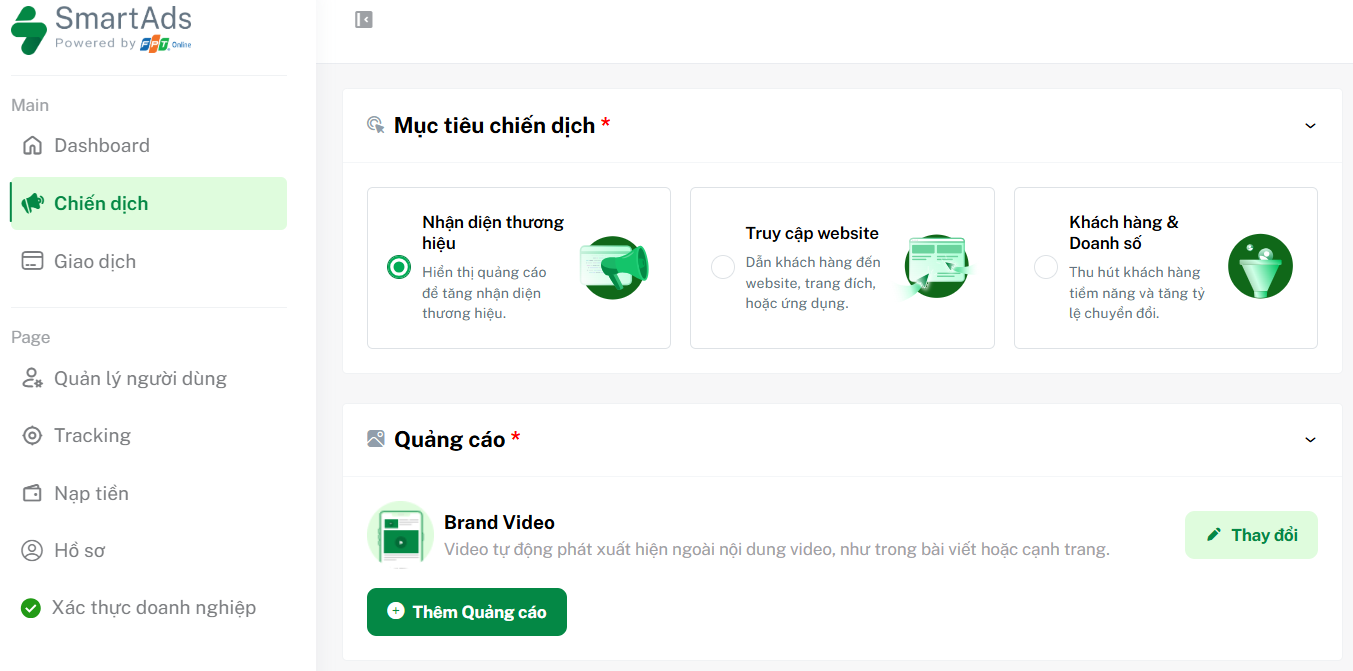
Step 4: In the Ads* section, click "Add ad". To change the ad format, click "Edit"
Step 5: Enter the destination URL and upload both the video ad and companion banner; add a title (optional); include brand name and logo; select an appropriate CTA
Step 6: Choose targeting options that match your audience segments
Step 7: Set campaign budget and bidding strategy
Step 8: Configure UTM tracking (if needed) before submitting the ad
>>> How to set up UTM tracking and SmartAds Pixel.
Note: Ensure your account has sufficient balance and valid advertising permissions before launching the campaign.
III. Brand Video Ads content and design specifications
On the SmartAds platform, Brand Video Ads consist of two main components: the video ad and a companion static banner displayed after the video ends.
* Content components:
-
Destination URL: Required
-
Title: Optional, maximum 65 characters
* Video specifications:
-
Format: MP4
-
Maximum file size: 50MB
-
Duration: From 6 to 180 seconds
* Companion banner specifications:
-
Format: JPG, PNG
-
Maximum file size: 20MB
-
Supported aspect ratios: 1:2 (300 x 600), 16:9 (1280 x 720), 1:1 (720 x 720), 9:16 (720 x 1280), 2:1 (600 x 300)
* Additional elements:
-
Brand name & logo
-
Call to Action (CTA)
-
Impression & Click tracker URL
* Content and display guidelines:
-
Brand messaging should be clearly integrated into the video with emotional and branding elements
-
The companion banner should visually align with the video for consistency
-
Avoid excessive small text that reduces readability
-
CTA should be suggestive and user-friendly, not overly forceful
IV. How to track Brand Video Ads performance on SmartAds
Once your campaign is live, you can monitor performance through impressions and engagement metrics on the Campaign Management or Dashboard.
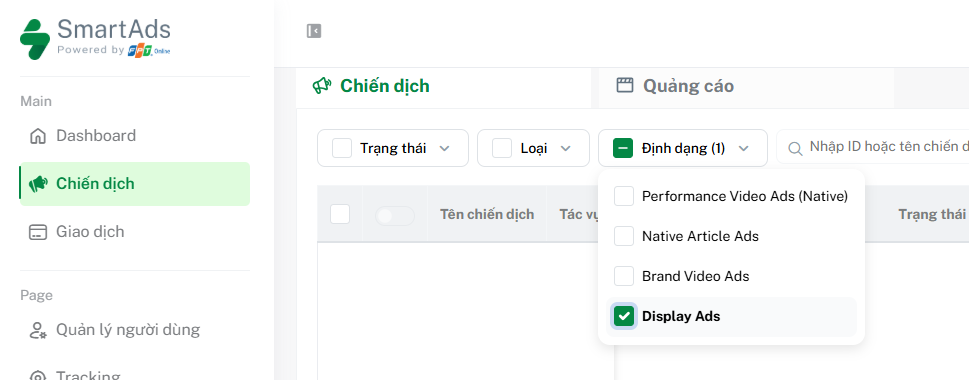
Here, you can filter by Brand Video Ads format and scroll horizontally to view reports. For deeper insights by campaign or creative, click the icon  in the action bar to access detailed analytics.
V. How to optimize Brand Video Ads campaigns
To maximize the effectiveness of Brand Video Ads on SmartAds, advertisers should consider the following:
-
Define clear video objectives: Branding, engagement, or traffic-driving goals
-
Capture attention within the first 3–5 seconds: This is the critical moment that determines whether users continue watching
-
Use concise and clear storytelling: Avoid overly long or unfocused videos without a clear message
-
Ensure consistency between video and banner: Maintain brand recall after video completion
-
Use relevant and compelling CTAs: Learn more, Explore now, Discover
-
Run A/B testing on video creatives and banners: Test multiple variations to optimize performance
-
Track engagement metrics: Combine impressions, views, clicks, VTR, completion rate, etc. to evaluate traffic quality
-
Ensure compliance: Follow platform policies on content and data privacy
VI. Brand Video Ads pricing (Outstream video), effective from April 2026
Pricing for Brand Video Ads format (VAT included):
|
Minimum CPM bid (VAT included) |
Site / group |
| 20,000 | All websites |
| 20,000 | All websites (Overseas targeting only) |
| 25,000 | Premium websites (VnExpress, Dan Tri, Thanh Nien, Tuoi Tre...) |
| 25,000 | English premium websites (English-language publishers) |
| 30,000 | VnExpress sites (including VnExpress.net group 2 & Ngoisao.VnExpress.net) |
| 30,000 | e.VnExpress site (English site: e.vnexpress.net) |
| 20,000 | Ngoisao (Ngoisao.VnExpress.net subsite) |
*Note:
SmartAds applies a fixed bidding mechanism. The listed pricing serves as a reference and represents the minimum bid on the platform. Actual campaign costs may vary depending on ad format, placement, booking duration, and specific publisher selection.