SmartAds targeting: four targeting methods within the advertising system
Targeting is the core foundation that determines the effectiveness of every digital advertising campaign. Instead of simply “showing ads to as many people as possible,” SmartAds focuses on reaching the right audience, in the right context, at the right time to optimize marketing performance and meet the diverse needs of businesses. Below are the main targeting methods:
1. Contextual targeting - Targeting based on content context
Contextual targeting is an advertising targeting method that delivers ads based on the content environment across SmartAds’ publisher network. Instead of relying on personal data, this approach aligns ad messages with relevant articles, categories, and topics to maximize contextual relevance and brand safety.
How it works:
Page content analysis: SmartAds’ AI technology analyzes topics, keywords, URLs, categories, and contextual signals to determine the relevance between an ad and the page where it may appear.
Relevant ad placement: Once a strong connection between content and advertising message is identified, ads are delivered in placements that match the surrounding editorial context.
Key characteristics:
Right context, real-time intent-based exposure: Ads are distributed based on the article being read, ensuring the message appears when users are in an active interest state. This method does not deeply analyze individual behavior but focuses on the surrounding content environment.
Cookie-independent and privacy-first compliant: By minimizing the use of personal data, contextual targeting aligns with evolving privacy regulations and data protection standards.
How to set up contextual targeting on SmartAds platform
How to set up on SmartAds:
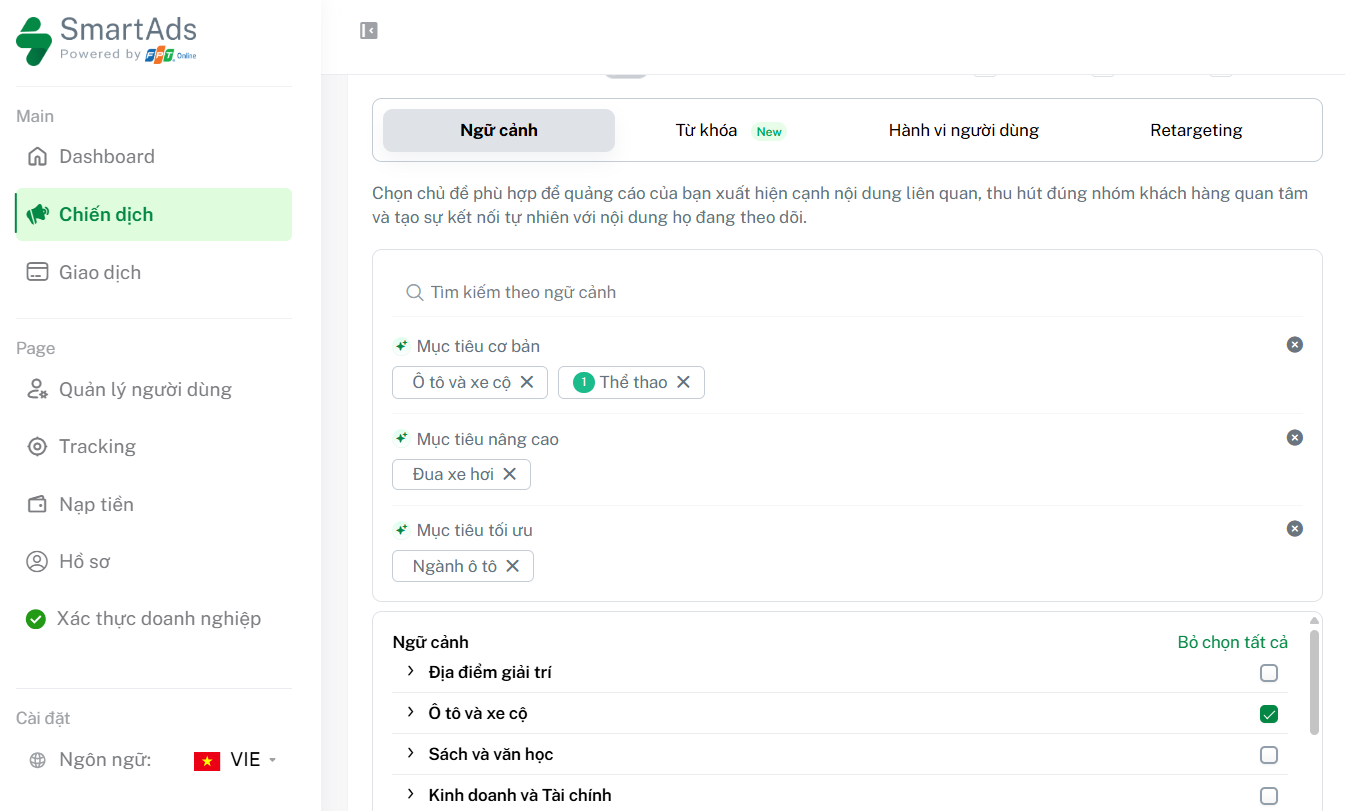
Step 1: Go to the Context tab in the Targeting section of your campaign.
Step 2: Identify and search for relevant topics aligned with your product or service from the suggested list.
Step 3: Select Basic targets to broaden the content scope (e.g., Automotive, Sports).
Step 4: Choose Advanced targets for more precise topic alignment (e.g., Car racing).
Step 5: Select Optimized targets to prioritize delivery within content most relevant to your industry (e.g., Automotive industry).
Step 6: Save your settings to finalize and launch the campaign.
2. Behavioral targeting (User behavior) - Targeting based on user behavior data
Behavioral targeting is an advertising targeting method based on readers’ content consumption and interaction data across the SmartAds publisher ecosystem, enabling interest-based advertising with greater personalization.
How it works:
User behavior analysis: The system records signals such as content categories viewed, visit frequency, and engagement levels to identify audience segments with shared interests.
Relevant ad delivery: Ads are shown to reader groups whose behavioral patterns indicate sustained interest in related topics or products.
Key characteristics:
Interest-based reach: Ads target audiences who have demonstrated genuine interest through repeated content interactions.
Reduced noise from accidental interest: While contextual visits may sometimes be driven by curiosity, behavioral targeting filters signals through repeated engagement patterns to identify stronger intent.
Enhanced personalization: Messages can be better aligned with the preferences and needs of specific audience groups, increasing engagement potential.
How to set up behavioral targeting on SmartAds platform
How to set up behavioral targeting on SmartAds:
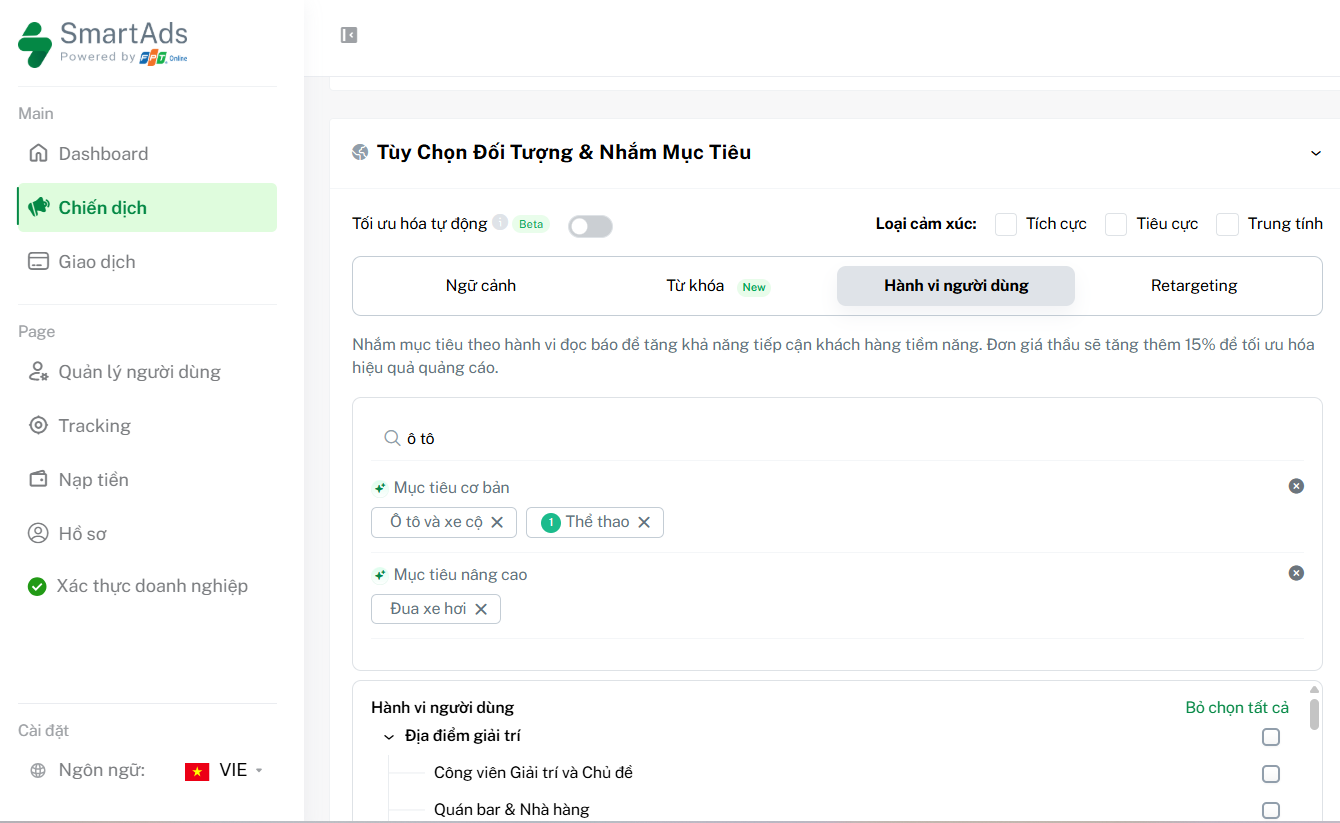
Step 1: Go to the User behavior tab in the Targeting section.
Step 2: Identify and search for relevant topics aligned with your product or service.
Step 3: Select Basic targets to define broader reading behavior by interest categories (e.g., Automotive, Sports).
Step 4: Choose Advanced targets for more precise behavioral alignment (e.g., Car racing).
Step 5: Save your settings to finalize and deploy the campaign.
3. Keyword targeting - Targeting based on content keywords
Keyword targeting is an ad targeting method based on specific keywords appearing within articles across the SmartAds publisher network, ensuring strong topical alignment between message and content.
How it works:
Define target keywords: Advertisers select a list of keywords relevant to their products or services.
Content matching: The system matches selected keywords against page content to determine relevance at the entity or topic level.
Relevant ad display: Ads are delivered when the content contains keywords aligned with campaign settings.
Key characteristics:
High topical precision: Ads appear within content environments directly related to the selected keywords.
Flexible contextual integration: By analyzing keywords, themes, and content tone simultaneously, this method ensures ads appear at the most relevant moment.
Cookie-independent and privacy-aligned: Similar to contextual targeting, keyword targeting minimizes personal data usage while complying with privacy-first standards.
How to set up keyword targeting on SmartAds platform
How to set up keyword targeting on SmartAds:
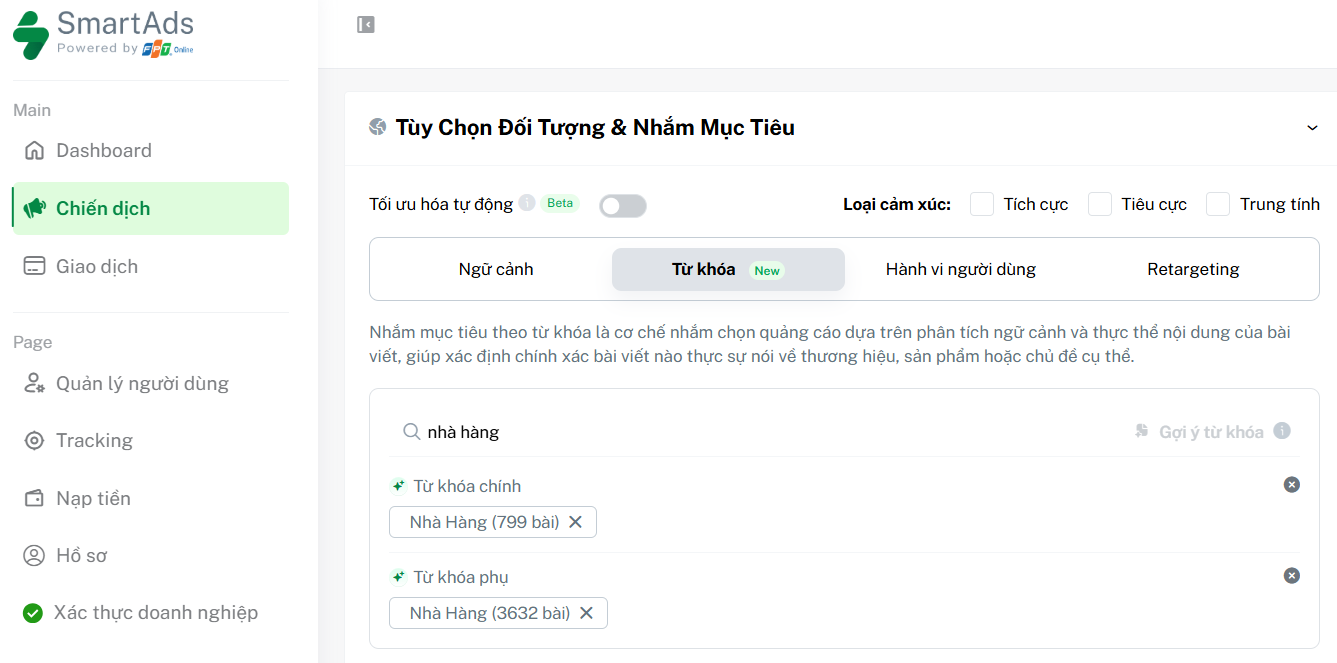
Step 1: Go to the Keywords tab in the Targeting section.
Step 2: Identify and search for relevant keywords aligned with your product or service.
Step 3: Select Primary keywords representing core topics or entities of the article to ensure high relevance to your brand message.
Step 4: Select Secondary keywords covering related concepts or products to expand reach while maintaining contextual relevance.
Step 5: Save your settings to complete the setup.
4. Retargeting - Re-engaging previous users
Retargeting is a performance marketing strategy focused on users who have previously interacted with your website or advertising campaigns within the SmartAds ecosystem, helping drive conversions and full-funnel performance.
How it works:
Interaction tracking: SmartAds’ tracking system collects data from touchpoints such as websites or prior campaigns to identify users who have shown measurable interest.
Retargeting ad delivery: Ads are shown again to these users across the publisher network, acting as reminder layers that encourage them to return and complete desired actions.
Key characteristics:
Higher conversion potential: Focusing on previously engaged users shortens the decision-making journey and improves performance efficiency.
Personalized messaging: Ad content can be tailored based on interaction depth (product views, cart abandonment, etc.), increasing response likelihood.
Full-funnel connection: Retargeting bridges awareness and conversion, maintaining brand presence throughout the customer journey.
How to set up retargeting campaigns on SmartAds platform
How to set up retargeting on SmartAds:
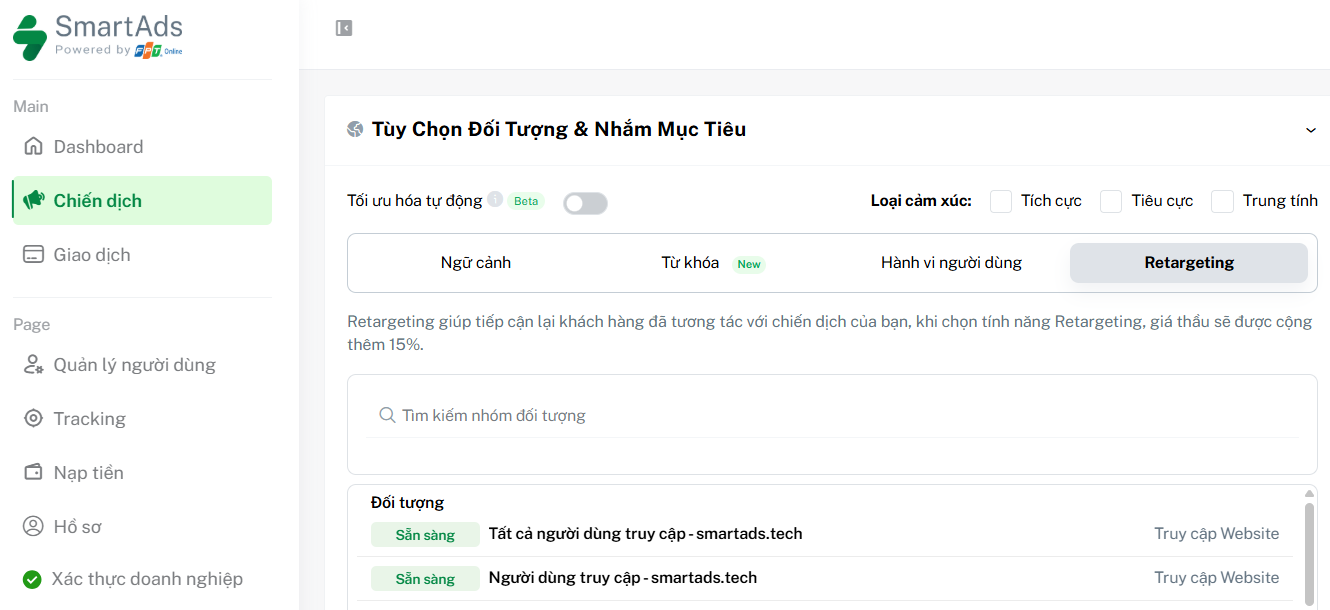
Step 1: Go to the Retargeting tab in the Targeting section.
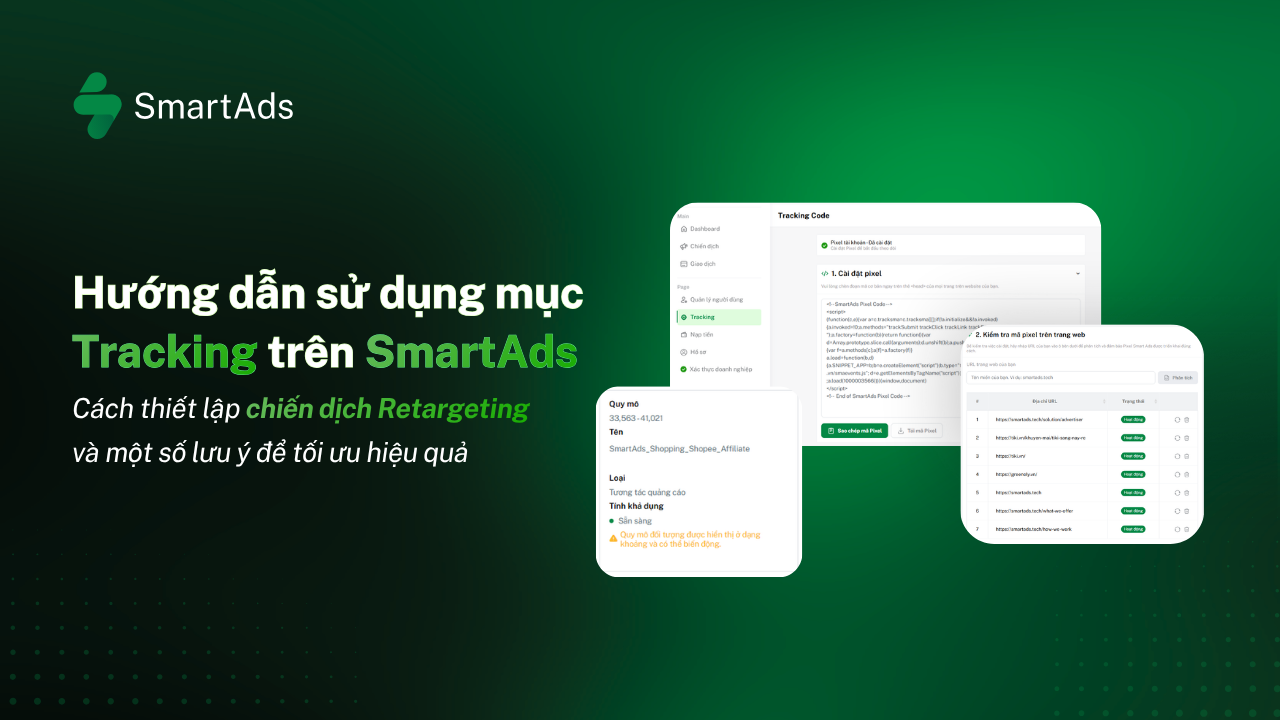
Step 2: Select audience segments based on recorded actions (page visits, product views, prior ad engagement). Ensure your landing page has implemented the SmartAds pixel beforehand. >>> View SmartAds pixel setup guide here.
Step 3: Set time-based or frequency conditions to control retargeting scope.
Step 4: Review and exclude audience groups that are no longer relevant.
Step 5: Save your settings to finalize and launch the campaign.
Combining sentiment targeting - Emotional optimization layer for four targeting methods
In addition to the four primary targeting methods, SmartAds expands its advertising ecosystem with Sentiment targeting (content emotion targeting), allowing advertisers to control the tonal environment in which ads appear. Delivering ads within trusted, contextually aligned editorial environments forms the foundation for building long-term brand trust and sustainable customer value. Register for a SmartAds account here to experience the system directly.