I. Giới thiệu về quảng cáo Native Article
Quảng cáo Native Article là hình thức quảng cáo nội dung được thiết kế và hiển thị như một bài viết biên tập trên các trang báo điện tử. Thay vì xuất hiện dưới dạng banner, Native Article hòa mình tự nhiên vào luồng tin, giúp thương hiệu kể câu chuyện, truyền tải thông điệp chuyên sâu mà không làm gián đoạn trải nghiệm đọc của người dùng. Mỗi mẫu quảng cáo được gắn với URL đích cụ thể, có thể là bài PR, advertorial, landing page hoặc nội dung chuyên đề của chiến dịch, đồng thời hỗ trợ đo lường hiệu quả hiển thị và tương tác.
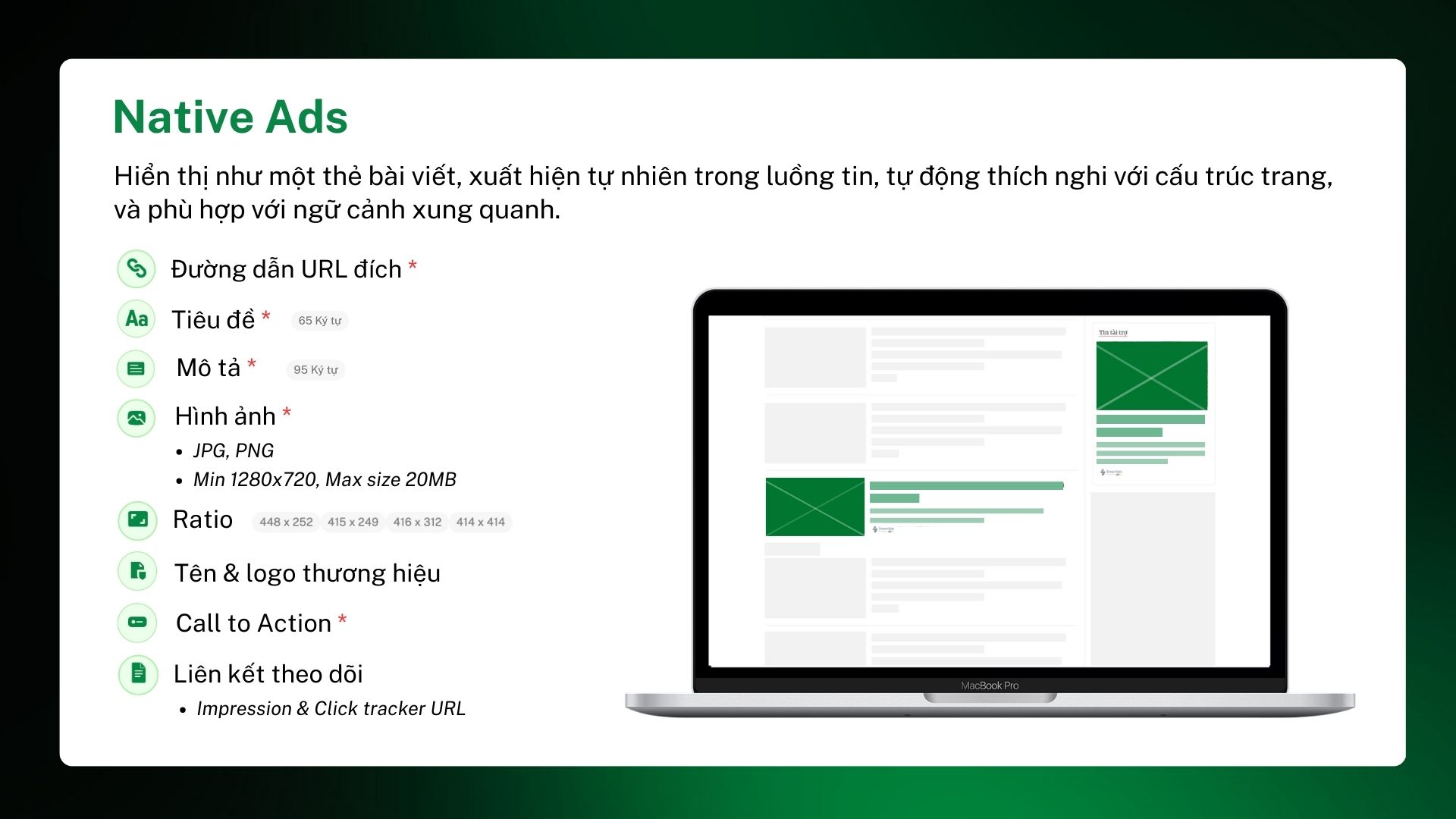
Trên hệ thống SmartAds, Native Article được triển khai kết hợp với AI, tự động thích nghi với cấu trúc và layout của từng publisher. Nội dung quảng cáo hiển thị dưới dạng thẻ bài viết, bao gồm tiêu đề, mô tả, hình ảnh đại diện, tên thương hiệu và CTA rõ ràng. Hình thức này đặc biệt phù hợp với các chiến dịch cần xây dựng nhận thức, tạo niềm tin và dẫn dắt người dùng ở giai đoạn đầu và giữa phễu marketing.
1.1. Native Article hỗ trợ đa dạng mục tiêu truyền thông
Định dạng Native Article của SmartAds phù hợp với nhiều ngành hàng và mục tiêu truyền thông khác nhau, từ thương hiệu lớn đến doanh nghiệp vừa và nhỏ. Cụ thể, Native Article có thể được sử dụng để:
-
Tăng nhận diện thương hiệu theo ngữ cảnh nội dung: Quảng cáo xuất hiện trong luồng tin tức, chuyên mục hoặc bài viết liên quan, giúp thương hiệu tiếp cận đúng nhóm độc giả đang quan tâm đến chủ đề tương đồng.
-
Truyền tải thông điệp chuyên sâu: Khác với banner ngắn gọn, Native Article cho phép thương hiệu dẫn dắt người đọc đến nội dung dài hơn, giàu thông tin, giúp giải thích rõ giá trị sản phẩm, dịch vụ hoặc câu chuyện thương hiệu.
-
Điều hướng traffic chất lượng về nội dung đích: Native Article thường mang lại tỷ lệ click và thời gian onsite cao hơn nhờ sự phù hợp về mặt ngữ cảnh và tâm lý tiếp nhận của người dùng.
-
Hỗ trợ chiến dịch PR, branding và content marketing: Định dạng này đặc biệt hiệu quả với các chiến dịch ra mắt sản phẩm, truyền thông thương hiệu, thought leadership hoặc xây dựng hình ảnh chuyên gia trong ngành.
1.2. Vị trí và cách hiển thị của Native Article
Native Article của SmartAds được phân phối trên hệ thống báo điện tử uy tín, hiển thị tại các vị trí như:
-
Luồng tin trang chủ
-
Danh sách bài viết theo chuyên mục
-
Khu vực đề xuất nội dung liên quan
-
Giữa hoặc cuối bài viết (tùy layout publisher)
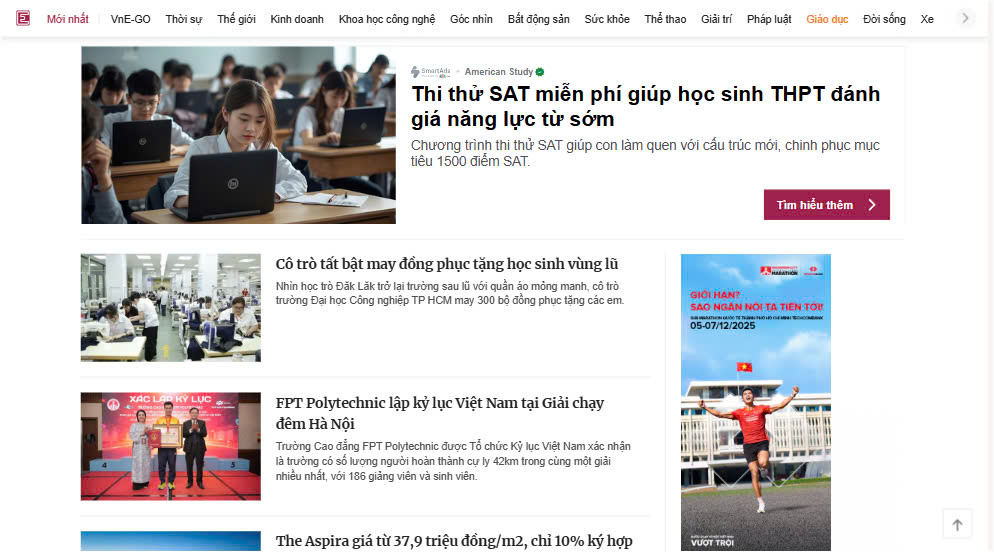
Nội dung quảng cáo được trình bày như một thẻ bài viết tự nhiên, bao gồm hình ảnh đại diện, tiêu đề, mô tả ngắn và nhãn nhận diện quảng cáo theo quy định
II. Cách thiết lập quảng cáo Native Article trên SmartAds
Doanh nghiệp có thể dễ dàng triển khai Native Article Ads trên SmartAds theo các bước sau:
Bước 1: Nhấn vào nút “Thêm chiến dịch”
Bước 2: Chọn định dạng “Native Article” và nhấn “Áp dụng” để thiết lập Creatives
Bước 3: Đặt tên chiến dịch và lựa chọn mục tiêu phù hợp
Bước 4: Ngay mục Quảng cáo* click vào nút "Thêm quảng cáo", tại đây khi muốn thay đổi định dạng quảng cáo, click vào nút "Thay đổi"
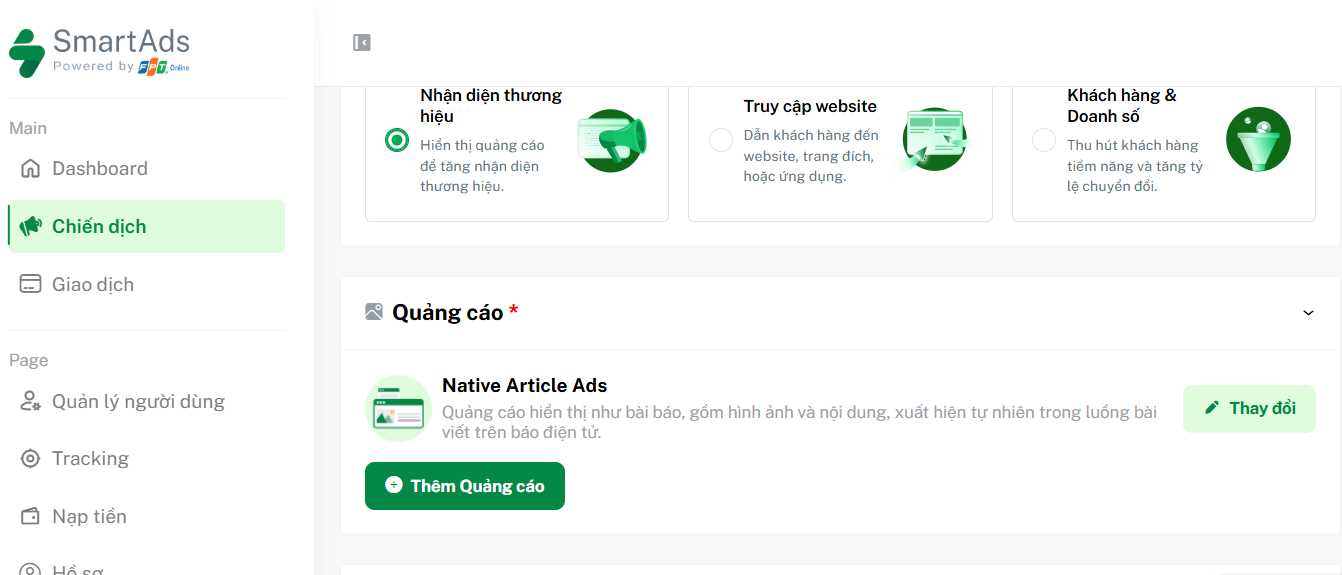
Bước 5: Nhập URL đích, tiêu đề, mô tả; Tải hình ảnh đại diện và chọn CTA
Bước 6: Lựa chọn các targeting phù hợp với nhóm khách hàng mục tiêu
Bước 7: Thiết lập ngân sách và giá thầu
Bước 8: Thiết lập UTM tracking (nếu cần) trước khi submit quảng cáo
Lưu ý: Đảm bảo tài khoản có đủ số dư và giấy phép quảng cáo hợp lệ trước khi chạy chiến dịch.
III. Quy cách nội dung và thiết kế Native Article
Trên SmartAds, Native Article hiển thị dưới dạng thẻ bài viết, với cấu trúc nội dung được chuẩn hóa nhằm đảm bảo khả năng hiển thị đồng đều trên nhiều publisher.
Thành phần nội dung Native Article:
-
URL đích: Bắt buộc
-
Tiêu đề: Tối đa 65 ký tự
-
Mô tả: Tối đa 95 ký tự
-
Tỷ lệ hiển thị hỗ trợ: 448 x 252, 415 x 249, 416 x 312, 414 x 414
-
Tên & logo thương hiệu
-
Call to Action (CTA)
-
Link theo dõi: Impression & Click tracker URL
Nguyên tắc nội dung và hiển thị:
-
Tiêu đề cần tự nhiên, mang tính thông tin, tránh giật gân quá mức
-
Mô tả tập trung vào giá trị nội dung, khơi gợi sự tò mò
-
Hình ảnh rõ nét, liên quan trực tiếp đến chủ đề bài viết
-
Hạn chế chữ chèn trong ảnh
-
Đảm bảo tính nhất quán về nhận diện thương hiệu
>>> Xem thêm các quy định khác tại đây.
IV. Cách xem kết quả của quảng cáo Native Article trên SmartAds
Sau khi quảng cáo bắt đầu chạy, bạn có thể theo dõi hiệu quả thông qua các chỉ số hiển thị và tương tác tại trang Quản lý chiến dịch hoặc Dashboard.
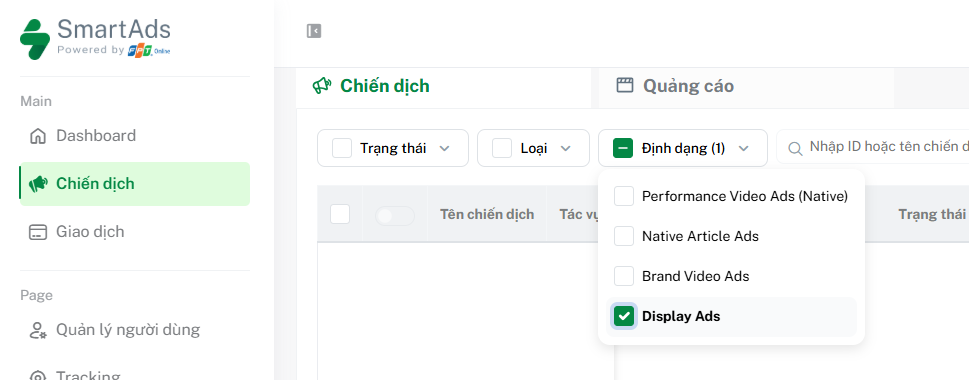
Tại đây, bạn có thể sử dụng bộ lọc theo định dạng Native Article Ads và cuộn theo phía bên phải để xem báo cáo. Để xem chi tiết theo chiến dịch hoặc creative, bạn có thể bấm vào biểu tượng  trên thanh tác vụ để vào trang báo cáo chi tiết.
V. Cách tối ưu chiến dịch Native Article Ads
Để tối ưu hiệu quả Native Article trên SmartAds, nhà quảng cáo nên lưu ý:
-
Xác định mục tiêu & KPI rõ ràng: Mỗi chiến dịch cần gắn với mục tiêu cụ thể như tăng nhận diện thương hiệu, thu lead hay thúc đẩy doanh số, đi kèm hệ chỉ số đo lường minh bạch.
-
Nghiên cứu chân dung khách hàng: Phân tích nhân khẩu học, hành vi trực tuyến và sở thích để đảm bảo thông điệp tiếp cận đúng nhóm mục tiêu.
-
Sử dụng chiến lược nhắm mục tiêu đa lớp: Kết hợp nhiều phương pháp như sở thích, từ khóa, đối tượng tùy chỉnh và remarketing nhằm mở rộng độ phủ nhưng vẫn giữ được độ chính xác.
-
Đặt trọng tâm vào giá trị thông tin: Nội dung càng hữu ích, khả năng click và đọc sâu càng cao, đồng thời cần ưu tiên lựa chọn chủ đề phù hợp ngữ cảnh của publisher.
-
Tối ưu tiêu đề theo hướng editorial: Gần với headline báo chí hơn là quảng cáo thuần túy, có thể kết hợp các số liệu và thông tin đã kiểm chứng để tăng độ thuyết phục. Đồng thời thực hiện A/B Testing để tối ưu CTR và giảm ad fatigue.
-
Tối ưu Creatives và đảm bảo nhất quán nhận diện thương hiệu: Màu sắc, logo, font chữ và giọng điệu cần được đồng bộ để tăng khả năng ghi nhớ.
-
Cá nhân hóa thông điệp: Tận dụng dữ liệu hành vi (khi có) để điều chỉnh nội dung phù hợp với từng nhóm người dùng.
-
Theo dõi và phân tích hiệu suất: Liên tục kiểm tra các chỉ số như impressions, clicks, CTR và conversions để kịp thời điều chỉnh chiến dịch.
-
Tuân thủ chính sách nền tảng: Đảm bảo nội dung quảng cáo và cách thu thập dữ liệu đáp ứng các quy định về quyền riêng tư và tiêu chuẩn hiển thị.
VI. Báo giá định dạng Native Article, áp dụng từ tháng 04/2026
Bảng giá áp dụng cho định dạng Native Article (đã bao gồm VAT):
|
Giá Bid tối thiểu CPC (đã bao gồm VAT) |
Giá Bid tối thiểu CPM (đã bao gồm VAT) |
Site/ Group |
| 3.300 | 20.000 | Tất cả Website |
| 3.300 | 20.000 |
Tất cả Website (Chỉ Targeting Oversea) |
|
5.500 |
25.000 |
Premium Websites (VnExpress, Dân Trí, Thanh Niên, Tuổi Trẻ...) |
|
5.500 |
25.000 |
English Premium Websites (trang Tiếng Anh) |
|
6.600 |
30.000 |
VnExpress Sites (gồm VnExpress.net & chuyên trang Ngoisao.VnExpress.net) |
|
5.500 |
30.000 |
e.VnExpress Site (trang Tiếng Anh e.vnexpress.net) |
|
4.400 |
20.000 |
Ngôi Sao (Chuyên trang Ngoisao.VnExpress.net) |
*Lưu ý:
SmartAds áp dụng cơ chế đấu giá cố định (fixed bidding). Bảng giá công bố chỉ mang tính tham khảo, là mức giá sàn trên hệ thống SmartAds. Chi phí triển khai thực tế có thể thay đổi tùy theo định dạng quảng cáo, vị trí hiển thị, thời gian booking và từng publisher cụ thể.